Project Overview
A U.S.-based service business was experiencing an intermittent issue with its WordPress contact forms. Although visitors successfully submitted their information, some notification emails were missing two important details: Date of Birth (DOB) and Calculated Age.
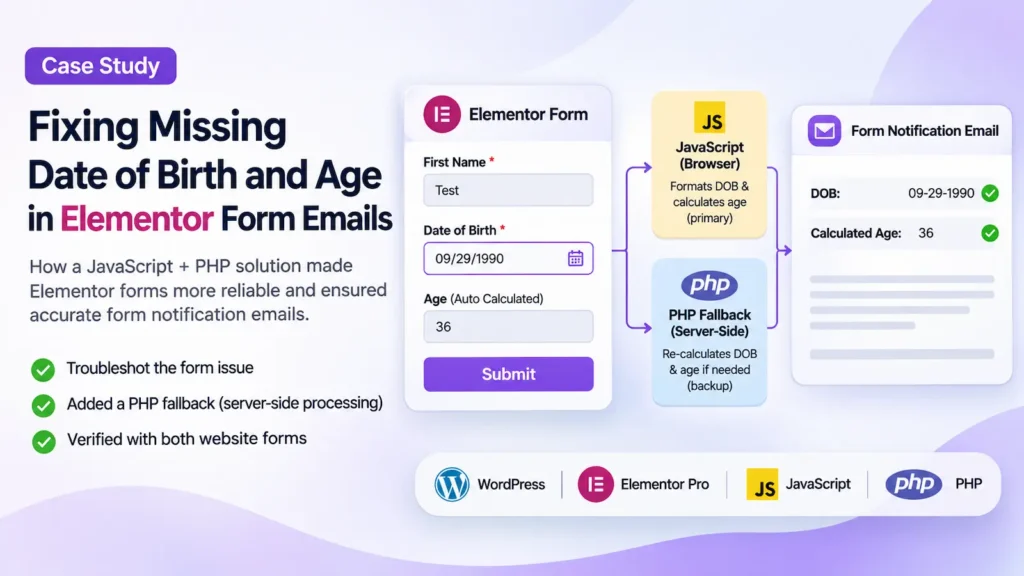
The website used Elementor Pro forms with custom JavaScript to format dates in the American format (MM-DD-YYYY) and automatically calculate each visitor’s age.
Most submissions worked correctly. However, occasional notification emails arrived without the formatted DOB and age, creating additional administrative work.
I investigated the issue, identified where the information was being lost, and implemented an additional PHP processing layer to make the form notifications more reliable.
The Challenge: Elementor Form Emails Missing Submitted Data
The website had two inquiry forms:
- A primary contact page form.
- A homepage form.
Both collected information such as name, email, phone number, Date of Birth, and other required details.
The DOB field was configured as required, meaning visitors were expected to provide their birth date before submitting the form.
The website also needed two specific functions:
- Display Date of Birth in the American format (MM-DD-YYYY).
- Automatically calculate the visitor’s age and include it in the notification email.
Custom JavaScript had already been implemented to handle both requirements.
However, the business occasionally received emails with missing DOB and age values.
The concern was whether visitors were submitting incomplete forms or whether the website was losing information during submission processing.
Investigation: Finding Where the Data Was Missing
I started by reviewing actual form notification emails and comparing them with the corresponding records saved in Elementor.
This revealed an important difference.
The visitors’ original dates of birth had been successfully collected and saved. Only the additional formatted DOB and calculated age fields were missing.
I confirmed this pattern in two affected submissions.
The original DOB field contained valid information, while the two additional fields used by the email notifications were empty.
This meant the problem was not simply visitors forgetting to enter their Date of Birth.
Instead, the evidence pointed toward an intermittent failure in the process that transferred and calculated the additional field values.
Understanding the Existing JavaScript Setup
The original implementation used three form fields:
| Field ID | Purpose |
|---|---|
birthday | Collects the original Date of Birth |
birthday_us | Stores the American-formatted date |
age | Stores the automatically calculated age |
The custom JavaScript used Flatpickr to manage date selection and formatting.
The script normally converted the selected date into MM-DD-YYYY format and calculated the person’s age.
However, the implementation depended on the browser successfully initializing and executing the custom script.
Several possible failure points were identified:
- The custom script might not initialize correctly on every page load.
- Manual date entry might not trigger the expected calculation.
- JavaScript execution or form-processing timing might prevent the additional values from being populated.
The exact cause of the intermittent behavior was not conclusively reproduced, but the saved submission records clearly identified the missing values.
Rather than rebuilding two generally functional forms, I focused on making the data-processing process more dependable.
The Solution: Adding Server-Side PHP Form Processing
I implemented a PHP fallback using Elementor Pro’s form-processing hook.
The purpose was straightforward: calculate the formatted DOB and age on the WordPress server instead of depending entirely on browser JavaScript.
The new code reads the original submitted Date of Birth and independently performs the two calculations.
1. Read the Original Date of Birth
The PHP code retrieves the original DOB from Elementor’s submitted form data.
It supports the date formats used in the existing setup and checks whether the submitted date is valid.
2. Convert the Date into American Format
After confirming the date is valid, PHP converts it to MM-DD-YYYY format.
This preserves the format required for the business’s notification emails.
3. Calculate the Visitor’s Age
PHP compares the submitted birth date with the current date to calculate the person’s completed years of age.
The calculation accounts for whether the person’s birthday has already occurred during the current year.
4. Update the Fields Before Email Delivery
The PHP code populates the birthday_us and age fields during Elementor’s server-side form processing, before the configured email and submission actions run.
This creates a second processing layer.
Even if the browser-based JavaScript fails to populate those fields, the server-side code is designed to calculate the values independently from the original DOB.
5. Preserve the Existing User Experience
An important part of this project was avoiding unnecessary changes to functionality that already worked.
The implementation preserved:
- Both existing Elementor forms.
- The American date display format.
- Automatic age calculation.
- The existing JavaScript functionality.
- The established email notification templates.
- The original form layouts and designs.
No form redesign was necessary.
Testing and Validation
After implementing the PHP code, I tested both forms on the website.
The tests included completing and submitting the forms, checking the email notifications, and reviewing Elementor’s saved submission records.
Verified Test Results
| Test | Contact Page Form | Homepage Form |
|---|---|---|
| Successful submission | Passed | Passed |
| Email notification delivered | Passed | Passed |
| American-formatted DOB appeared in email | Passed | Passed |
| Calculated age appeared in email | Passed | Passed |
| DOB saved in Elementor | Passed | Passed |
| Formatted DOB saved in Elementor | Passed | Passed |
| Calculated age saved in Elementor | Passed | Passed |
Both post-implementation test submissions contained the expected DOB and age values.
The existing JavaScript and new PHP code were active during these tests, confirming that the additional server-side processing did not disrupt the tested form functionality.
A separate test deliberately simulating JavaScript failure had not yet been completed, so the PHP fallback’s independent recovery behavior was not directly verified during this testing phase.
Results: A More Reliable Elementor Form Setup
The project achieved several important technical outcomes.
1. The missing-information issue was isolated.
By comparing email notifications with Elementor’s saved records, I established that the original DOB was being collected correctly in the affected submissions.
2. An additional server-side processing layer was implemented.
The website no longer relies exclusively on JavaScript to generate the formatted date and calculated age.
3. Both forms passed post-implementation testing.
The notification emails and saved Elementor submissions displayed the expected date and age values.
4. The existing forms were preserved.
The additional functionality was introduced without rebuilding the forms or changing their design.
What These Results Mean
The new PHP fallback is intended to reduce the likelihood of missing DOB and age values in future notification emails.
The verified outcome is that both forms worked correctly with the fallback enabled and produced the expected data during testing.
Longer-term monitoring is still needed to establish whether the intermittent issue has been completely eliminated.
No increase in leads, conversion rate, or revenue is attributed to this technical fix.
Why This Approach Matters for WordPress Websites
This project demonstrates an important principle of WordPress form development: business-critical data should not depend entirely on client-side JavaScript when reliable server-side processing is available.
JavaScript is useful for improving visitor experience through date formatting, interactive fields, and instant calculations.
However, JavaScript execution can vary depending on browser behavior, page loading, plugin interactions, and how visitors enter information.
Server-side processing can provide an additional layer of reliability by calculating and validating information after WordPress receives the submission.
For Elementor Pro websites that depend on accurate contact information, this layered approach can help reduce avoidable administrative work.
Frequently Asked Questions
Why does an Elementor form email sometimes have missing fields?
Missing values can result from incorrect field IDs, email template configuration, JavaScript synchronization problems, or other issues during form processing.
The first step is to compare the email with the corresponding saved Elementor submission. If the original field contains the data but a calculated or formatted field is empty, the problem may involve how the additional field value is generated.
Can Elementor Pro calculate age from a Date of Birth?
Yes. Elementor Pro forms can be extended with custom JavaScript or PHP to calculate age from a submitted Date of Birth.
JavaScript can calculate and display age in the browser, while PHP can calculate the value on the server during form processing.
Can PHP fix missing calculated values in Elementor email notifications?
PHP can help when the original submitted information is available but an additional calculated field is missing.
Using Elementor Pro’s form-processing hooks, developers can calculate values and update form records before notification emails are generated.
The implementation must be tested with the website’s specific form configuration.
Is PHP more reliable than JavaScript for Elementor form calculations?
Server-side PHP does not depend on the visitor’s browser executing a custom script successfully. This makes it a useful backup for important calculated values.
JavaScript and PHP can complement each other: JavaScript improves the visitor experience, while PHP provides server-side processing and validation.
Final Takeaway
This project was not about replacing a broken website or rebuilding its forms.
It was about identifying an intermittent data-processing issue, preserving the functionality that already worked, and introducing an additional layer of reliability.
By combining Elementor Pro, JavaScript, and server-side PHP processing, I implemented a more resilient approach to handling Date of Birth formatting and automatic age calculation.
The project illustrates how targeted WordPress troubleshooting can address a specific business problem without requiring an unnecessary redesign.
Need Help Fixing Elementor Forms or WordPress Issues?
WordPress form problems are not always obvious. Sometimes a form submits successfully while important information is missing from the notification email.
I help businesses investigate and resolve WordPress and Elementor issues, including form submissions, email notifications, custom field calculations, JavaScript conflicts, and PHP functionality.
Whether you’re experiencing missing form data, inconsistent notifications, or unreliable website features, I can help identify the cause and implement a practical solution.
Get a Quote to discuss your WordPress project.
Case study by Rashed Hasan, Rashed Digital. Client identity and personal submission details have been withheld for confidentiality.